The Distributed Commit Log
At its core, Kafka is a distributed commit log. Think of it like a shared notebook that multiple writers can append to but nobody can erase. Every message written to Kafka is appended to the end of a log, given a sequential number (offset), and stored durably on disk. This simple concept is what makes Kafka so powerful — it's an append-only, ordered, persistent record of everything that happened.
Unlike traditional message queues (RabbitMQ, SQS) where messages are deleted after consumption, Kafka retains messages for a configurable period (default 7 days). This means multiple consumers can read the same data independently, at their own pace, and even replay history.
Why this matters
The commit log model means Kafka isn't just a message bus — it's a source of truth. You can rebuild application state by replaying the log. This is the foundation of event sourcing, stream processing, and change data capture (CDC).
Brokers — The Servers
A Kafka broker is a server that stores data and serves client requests. A Kafka cluster is a group of brokers working together. In production, you typically run 3 or more brokers for fault tolerance — if one broker dies, the others take over.
Each broker is identified by a unique numeric ID. Brokers handle millions of reads and writes per second. They store data on disk (not just in memory), which sounds slow but Kafka uses sequential I/O and OS page cache to achieve throughput that rivals in-memory systems.
# List all brokers in a cluster
kafka-metadata.sh --snapshot /var/kafka-logs/__cluster_metadata-0/00000000000000000000.log --broker-list

# Describe broker configuration
kafka-configs.sh --bootstrap-server localhost:9092 --entity-type brokers --entity-name 0 --describeTopics — Named Feeds
A topic is a named category or feed of messages. Think of topics as tables in a database — you might have a user-signups topic, a page-views topic, and an orders topic. Producers write to topics, consumers read from topics.
Topics are logical — they don't live on a single broker. Instead, each topic is divided into partitions that are spread across multiple brokers. This is how Kafka achieves parallelism and scalability.
# Create a topic with 3 partitions and replication factor 3
kafka-topics.sh --bootstrap-server localhost:9092 \
  --create --topic user-events \
  --partitions 3 --replication-factor 3

# List all topics
kafka-topics.sh --bootstrap-server localhost:9092 --list

# Describe a topic (shows partitions, replicas, ISR)
kafka-topics.sh --bootstrap-server localhost:9092 --describe --topic user-eventsTopic: user-events TopicId: abc123 PartitionCount: 3 ReplicationFactor: 3 Topic: user-events Partition: 0 Leader: 1 Replicas: 1,2,3 Isr: 1,2,3 Topic: user-events Partition: 1 Leader: 2 Replicas: 2,3,1 Isr: 2,3,1 Topic: user-events Partition: 2 Leader: 3 Replicas: 3,1,2 Isr: 3,1,2
Partitions — The Unit of Parallelism
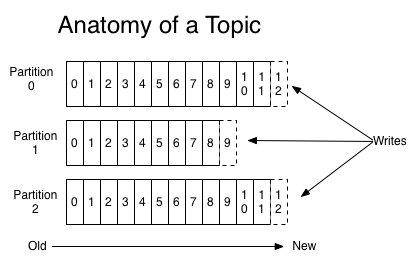
A partition is an ordered, immutable sequence of messages. Each partition is a separate log file on disk. When a producer sends a message, it goes to exactly one partition of the topic (determined by the message key or round-robin).
Partitions are Kafka's secret to scalability. If you have 3 partitions and 3 consumers, each consumer reads from one partition in parallel. More partitions = more parallelism = more throughput. But don't go overboard — each partition has overhead (file handles, memory, replication traffic).
| Partitions | Max Parallel Consumers | Use Case |
|---|---|---|
| 1 | 1 | Low volume, strict ordering needed |
| 3-6 | 3-6 | Most applications |
| 12-30 | 12-30 | High throughput |
| 100+ | 100+ | Extreme scale (LinkedIn, Netflix) |
Offsets — Your Position in the Stream
An offset is a unique, sequential number assigned to each message within a partition. It's like a page number in a book. Offset 0 is the first message, offset 1 is the second, and so on. Offsets are never reused, even after messages expire.
Each consumer tracks its own offset — "I've read up to offset 42 in partition 0." This is how Kafka enables multiple independent consumers to read the same topic at different speeds without interfering with each other.
# Check consumer group offsets (where each consumer is in each partition)
kafka-consumer-groups.sh --bootstrap-server localhost:9092 \
--describe --group my-appGROUP TOPIC PARTITION CURRENT-OFFSET LOG-END-OFFSET LAG my-app user-events 0 1042 1050 8 my-app user-events 1 998 998 0 my-app user-events 2 1105 1200 95
The LAG column is crucial — it shows how far behind each consumer is. Partition 2 has a lag of 95, meaning 95 messages are waiting to be processed. High lag means your consumer can't keep up.
Replication — Fault Tolerance
Every partition is replicated across multiple brokers. One replica is the leader (handles all reads and writes), and the others are followers (passively replicate from the leader). If the leader dies, a follower is automatically promoted to leader.
The ISR (In-Sync Replicas) is the set of replicas that are fully caught up with the leader. The setting min.insync.replicas controls how many replicas must acknowledge a write before it's considered committed. With acks=all and min.insync.replicas=2, you're guaranteed that at least 2 brokers have the data before the producer gets a success response.
⚠️ Common Mistake: replication-factor = 1
Wrong: Creating topics with --replication-factor 1 in production.
Why: If the single broker holding that partition dies, the data is gone. No recovery possible.
Instead: Always use --replication-factor 3 in production. This tolerates 1 broker failure (or 2 with min.insync.replicas=2).
ZooKeeper vs KRaft
Traditionally, Kafka used ZooKeeper to manage cluster metadata (broker list, topic configs, leader election). Starting with Kafka 3.3, KRaft mode (Kafka Raft) replaces ZooKeeper with a built-in consensus protocol. KRaft is simpler to operate (one less system to manage), scales better, and is now the recommended approach.
| Feature | ZooKeeper | KRaft |
|---|---|---|
| Dependency | Separate ZooKeeper cluster | Built into Kafka |
| Scaling | Limited by ZK | Millions of partitions |
| Recovery time | Minutes | Seconds |
| Status | Deprecated (removal in 4.0) | Production ready |
🔍 Deep Dive: How Kafka Achieves High Throughput
Kafka achieves millions of messages per second through several design choices: (1) Sequential I/O — appending to the end of a file is much faster than random writes. (2) Zero-copy — data goes from disk to network socket without copying through application memory. (3) Batching — messages are sent in batches, amortizing network overhead. (4) Compression — batches are compressed (gzip, snappy, lz4, zstd). (5) Page cache — the OS caches recently written data in memory, so consumers reading recent data hit memory, not disk.
Named feed of messages
Ordered, immutable log
Position in partition
Server in cluster
Partition copy
Parallel readers
Practice Exercises
Easy Draw the Architecture
Sketch a 3-broker Kafka cluster with 1 topic, 3 partitions, replication factor 2. Label leaders and followers.
Medium Partition Assignment
If you have 6 partitions and 3 consumers in a group, how are partitions assigned? What if a consumer fails?
Practice Exercises
Easy Hello World Variant
Modify the example to accept user input and print a personalized greeting.
Easy Code Reading
Read through the code examples above and predict the output before running them.
Medium Extend the Example
Take one code example and add error handling, input validation, or a new feature.