What Are Consumer Groups?
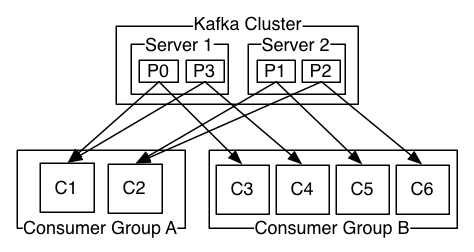
A consumer group is a set of consumers that cooperate to read from a topic. Kafka automatically distributes partitions among consumers in the group — each partition is assigned to exactly one consumer. This is how Kafka achieves parallel processing.
Think of it like a team of workers processing orders. Each worker (consumer) handles a subset of orders (partitions). If a worker goes home sick, their orders are redistributed to the remaining workers (rebalancing).
Key Rules
- Each partition is consumed by exactly one consumer in a group
- A consumer can read from multiple partitions
- If consumers > partitions, some consumers sit idle
- Different consumer groups read independently (each gets all messages)
| Partitions | Consumers | Assignment | Note |
|---|---|---|---|
| 6 | 3 | 2 partitions each | Ideal — even distribution |
| 6 | 6 | 1 partition each | Maximum parallelism |
| 6 | 8 | 6 active, 2 idle | Extra consumers wasted |
| 6 | 1 | All 6 partitions | No parallelism |
Monitoring Consumer Groups
# List all consumer groups
kafka-consumer-groups.sh --bootstrap-server localhost:9092 --list

# Describe a group (shows lag per partition)
kafka-consumer-groups.sh --bootstrap-server localhost:9092 \
  --describe --group my-app

# Reset offsets to earliest (reprocess all data)
kafka-consumer-groups.sh --bootstrap-server localhost:9092 \
  --group my-app --topic user-events \
--reset-offsets --to-earliest --executeGROUP TOPIC PARTITION CURRENT-OFFSET LOG-END-OFFSET LAG CONSUMER-ID my-app user-events 0 1042 1050 8 consumer-1 my-app user-events 1 998 998 0 consumer-2 my-app user-events 2 1105 1200 95 consumer-3
The LAG column is the most important metric. High lag means consumers can't keep up with producers. If lag keeps growing, you need to add more consumers (up to the partition count) or optimize processing speed.
⚠️ Common Mistake: More consumers than partitions
If you have 3 partitions and scale to 6 consumers, 3 consumers sit completely idle. Always ensure partition count ≥ consumer count. Scale partitions first.
P0, P1
P2, P3
P4, P5
Practice Exercises
Easy Hello World Variant
Modify the example to accept user input and print a personalized greeting.
Easy Code Reading
Read through the code examples above and predict the output before running them.
Medium Extend the Example
Take one code example and add error handling, input validation, or a new feature.