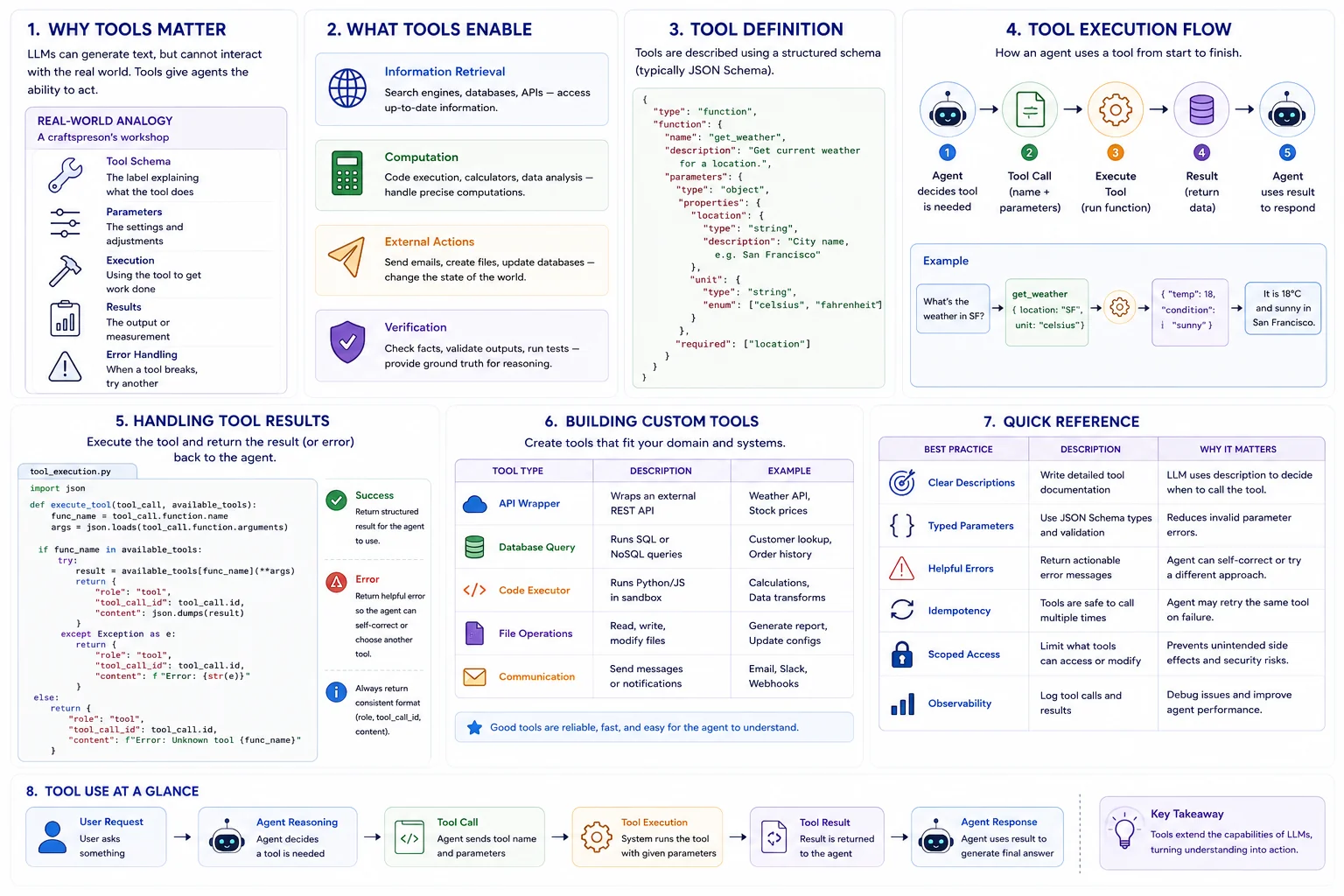
Why Tools Matter
Why Tool Use Matters
The Problem: LLMs can only generate text -- they cannot browse the web, query databases, execute code, or interact with external systems on their own.
The Solution: Tools bridge the gap between language understanding and real-world action, giving agents the ability to fetch data, compute results, and modify external state.
Real Impact: Tool use transforms LLMs from knowledge retrieval systems into action-taking agents that can accomplish real tasks.
Real-World Analogy
Think of tools as a craftsperson's workshop:
- Tool Schema = The label on each tool explaining what it does
- Parameters = The settings and adjustments on each tool
- Execution = Actually using the tool to shape the material
- Results = The output or measurement the tool provides
- Error Handling = Knowing when a tool breaks and grabbing another
What Tools Enable
Information Retrieval
Search engines, databases, APIs -- tools let agents access up-to-date information beyond training data.
Computation
Code execution, calculators, data analysis -- tools handle precise computations LLMs cannot do reliably.
External Actions
Sending emails, creating files, updating databases -- tools let agents change the state of the world.
Verification
Checking facts, validating outputs, running tests -- tools provide ground truth for agent reasoning.
Tool Definition
# Define a tool using JSON Schema format
tools = [{
    "type": "function",
    "function": {
        "name": "get_weather",
        "description": "Get current weather for a location.",
        "parameters": {
            "type": "object",
            "properties": {
                "location": {
                    "type": "string",
                    "description": "City name, e.g. San Francisco"
                },
                "unit": {
                    "type": "string",
                    "enum": ["celsius", "fahrenheit"]
                }
            },
            "required": ["location"]
        }
    }
}]
Tool Execution Flow
Handling Tool Results
import json

def execute_tool(tool_call, available_tools):
    func_name = tool_call.function.name
    args = json.loads(tool_call.function.arguments)

    if func_name in available_tools:
        try:
            result = available_tools[func_name](**args)
            return {
                "role": "tool",
                "tool_call_id": tool_call.id,
                "content": json.dumps(result)
            }
        except Exception as e:
            return {
                "role": "tool",
                "tool_call_id": tool_call.id,
                "content": f"Error: {str(e)}"
            }
Building Custom Tools
| Tool Type | Description | Example |
|---|---|---|
| API Wrapper | Wraps an external REST API | Weather, stock prices |
| Database Query | Runs SQL or NoSQL queries | Customer lookup |
| Code Executor | Runs Python/JS in sandbox | Calculations, transforms |
| File Operations | Read, write, modify files | Report generation |
| Communication | Send messages/notifications | Email, Slack, webhooks |
Quick Reference
| Best Practice | Description | Why |
|---|---|---|
| Clear descriptions | Write detailed tool docs | LLM uses description to decide when to call |
| Typed parameters | Use JSON Schema types | Reduces invalid parameter errors |
| Error messages | Return helpful errors | Agent can self-correct |
| Idempotency | Safe to call multiple times | Agent may retry on failure |
| Scoped access | Limit what tools can do | Prevents unintended side effects |